
How are we preparing for SAP S/4HANA implementation? Does my custom code work in SAP S/4HANA? How about those business functions or add-ons we use? And integrations?
How can we best utilize SAP Fiori? What Fiori applications do we need and how we implement them?
How do business process KPIs look like? How can we improve them?
How much server capacity do we need in order to run SAP S/4HANA?
These are some of the questions that come in mind when thinking about starting SAP S/4HANA project. The best tool for finding answers is SAP Readiness Check 2.0.
SAP Readiness Check has been in use since May 2017. Two years later in May 2019 the new functionalities containing Readiness Check 2.0 were introduced. The results from Readiness Check 1.0 can still be utilized till the end of 2019, but SAP recommends making a new analysis with Readiness Check 2.0.

Compared to the first version, Readiness Check 2.0 includes many new and improved analysis tools but also dashboard look and usability are improved along the design based on SAP Fiori 3.0. Readiness Check 2.0 can now be used only as an online application and it can’t be downloaded yet in Word-format report as in Readiness Check 1.0. This functionality has been replaced with new authorization concept which brings flexibility for result utilization. The authorizations of each analysis’ results can be managed in SAP Readiness Check application and S‑user doesn’t need to be created for everyone who needs access to the results. This way authorizations levels (read-only vs. editing permissions) can be easily managed.
SAP Readiness Check 2.0 preparation in ERP system is executed in a same way as in previous version. The analysis runs’ end results in development and production systems are zip files that are uploaded to SAP Readiness Check 2.0 application. After this, the analysis itself takes less than half an hour to complete. If needed, the analysis can also be updated later by uploading a new zip file to the application. Therefore, for example, Simplification Item analysis part can be updated while other parts’ contents remain the same. The difference between Readiness Check 1.0 and 2.0 preparations is that the newer version can’t be prepared via Solution Manager.
Simplification Item Check in new Readiness Check lists all the necessary actions within each item. Those actions can also be separated to different categories based on if they are mandatory, conditional or optional. Manual status and comment field of each item help dividing work and tracking progress. The items are already divided in categories according their relevancy from the current ERP system’s point of view. Therefore, the most important and urgent activities can be focused right from the beginning of a project.
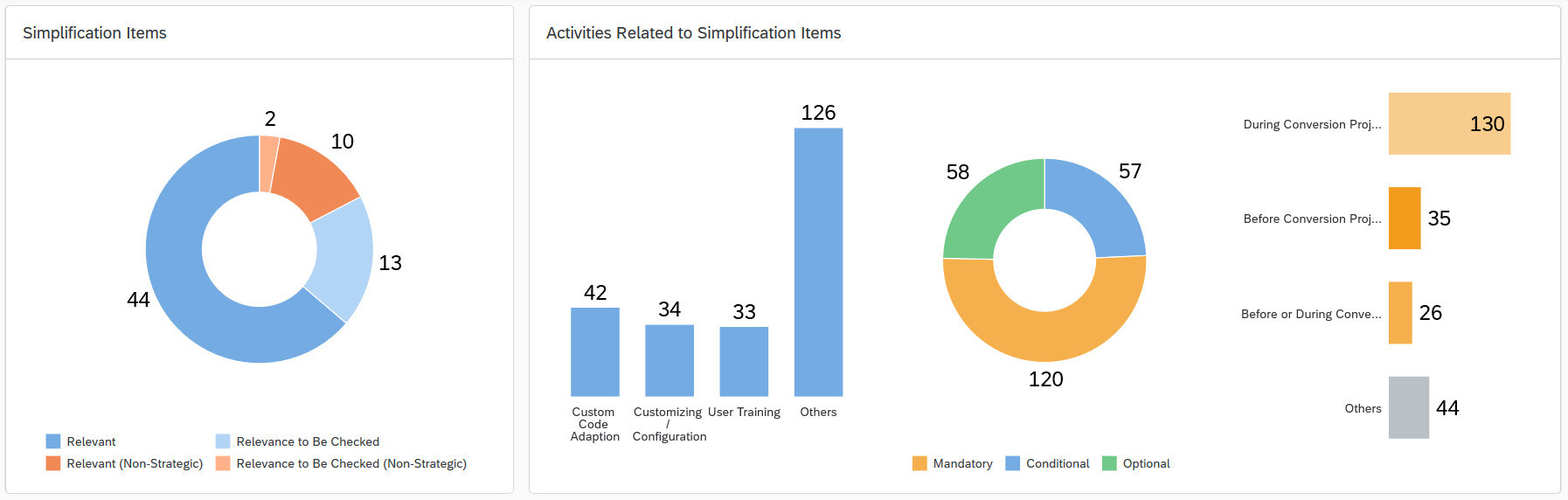
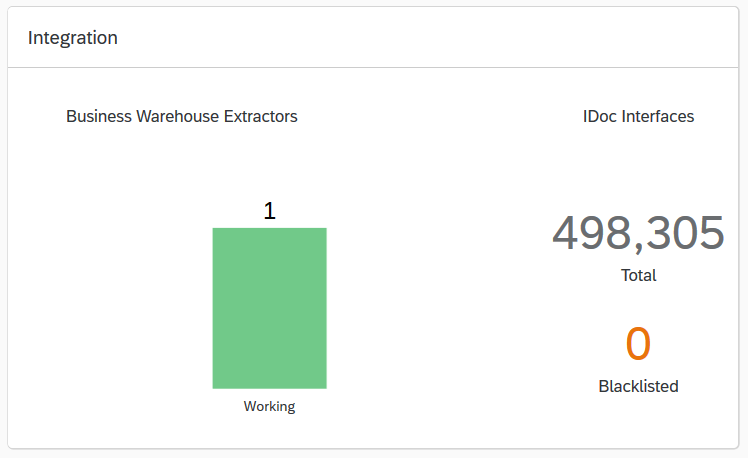
Same than in Simplification Item Check, Add-On and Business Function Check functionalities are also being improved in Readiness Check 2.0. Renewed categorization, comment field and possibility to manually add third-party Add-On compatibility ease understanding data and track the situation. A new part in Readiness Check 2.0 analysis, besides integration part Business Warehouse Extractors, is iDoc interfaces. The analysis lists iDoc interfaces that might cause problems when transferring to SAP S/4HANA environment.
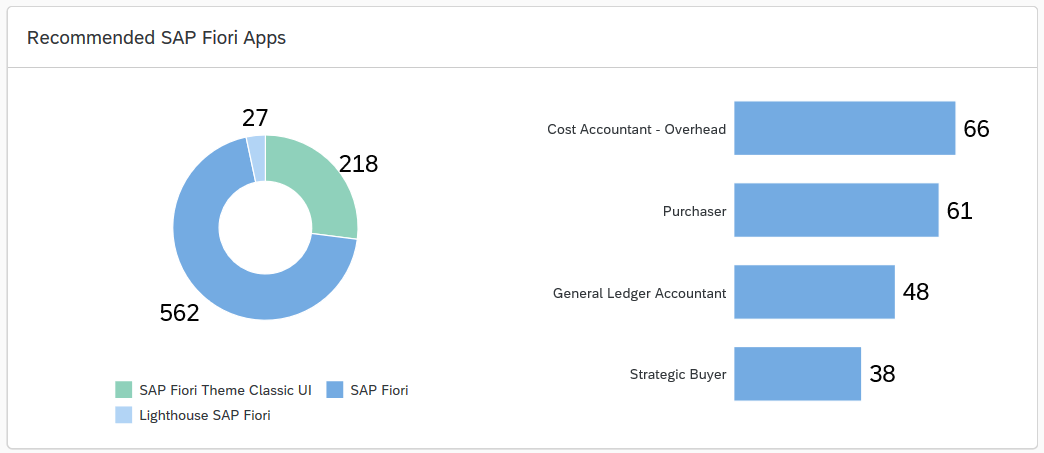
SAP Readiness Check analysis is a good basis for SAP Fiori implementation. Readiness Check offers recommendations for business roles and Fiori applications based on the analysis of current SAP ERP system’s transaction use. If there is no previous Fiori implementation, the most recommended start approach is to examine recommended Lighthouse SAP Fiori applications list, which contains SAP key applications. Fiori applications are divided according to business roles what helps to understand the Fiori concept. Those roles recommended by Readiness Check can be manually set In Scope or Out of Scope status and applications can be tagged as favourite what helps keep in track the selection of suitable Fiori applications.
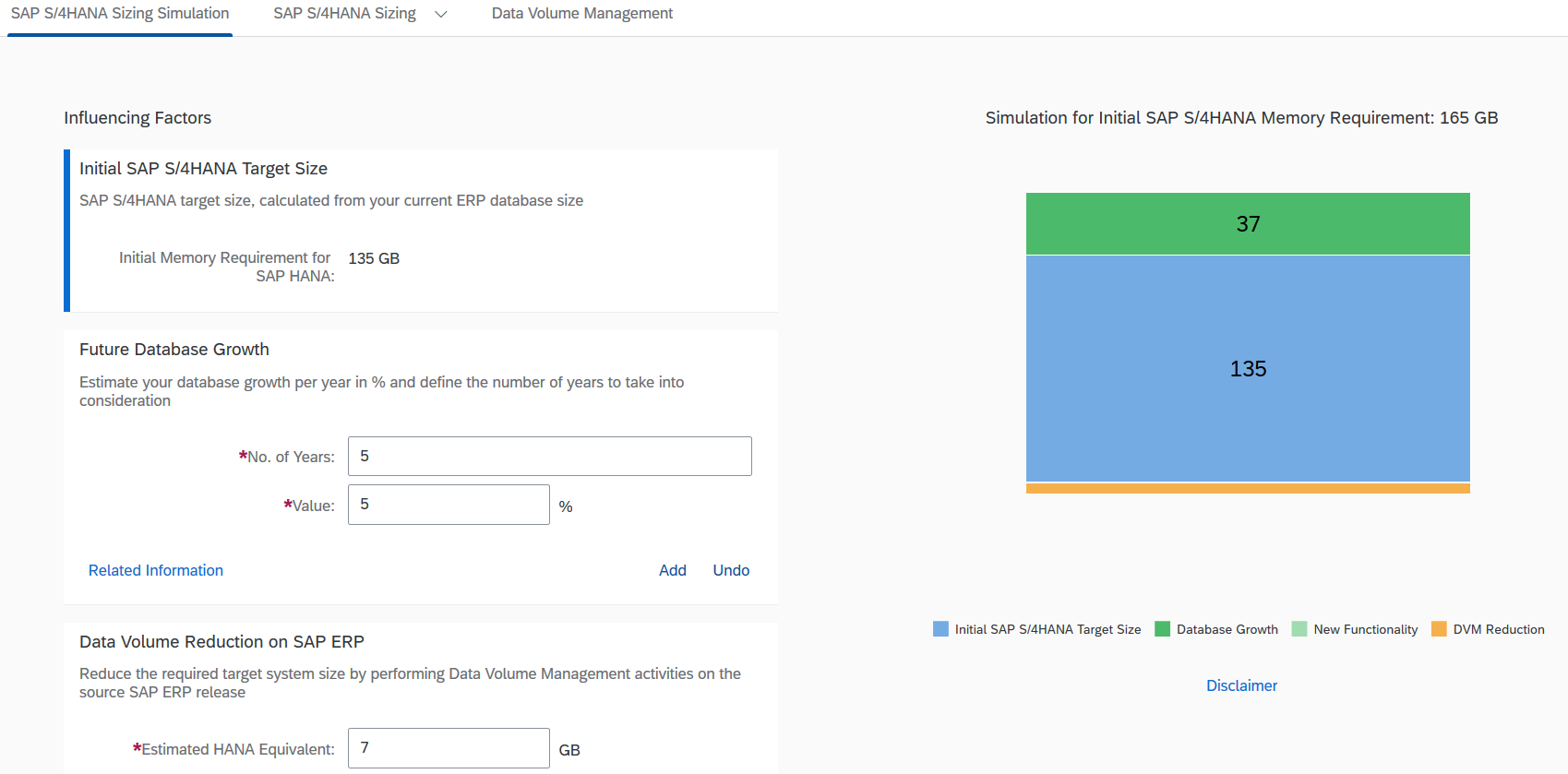
Other notable functionalities are for example Business Process Discovery which identifies business process optimization potential, and SAP S/4HANA Sizing simulation where database size change can be evaluated according to the growth from new functionalities and reduction from Data Volume Management actions.
SAP Readiness Check is an important part of ISLET S/4HANA assessment. It is used for both technical and application side reviews. Furthermore, in the assessment business values are explored when transferring to S/4HANA and roadmap is made for the upcoming years. We carry out assessments according to customer’s needs with different emphasis. We are happy to tell you more.
If you got interested and want to discuss further, please contact:
Tommi Luoto
CTO, Isletter
+358 40 574 1261
tommi.luoto@isletgroup.fi
Author Sanna Tiihonen is ISLET’s technical SAP consultant with almost 20 years of experience in tech industry. She is always willing to help other Isletters and is very passionate towards self-development and learning.
#SAP #ISLETGroup #ReadinessCheck #S4HANA #HANA #S4HANAAssessment #Fiori #IsletNews # Isletter #Blog #conversion